๐Ÿš€ New batches open: Advanced Excel โ€ข Power BI โ€ข SQL โ€ข AI for Analytics โ€” Book a free demo
Home / Courses

Courses built around real work.

Choose one skill or build the complete Data Analytics + Automation stack.

๐Ÿ“Š
Beginner โ†’ Advanced

Advanced Excel

Master formulas, dashboards, Power Query and advanced reporting.

  • XLOOKUP & INDEX-MATCH
  • PivotTables & dashboards
  • Power Query
  • Advanced reporting
โฑ 6 weeksโ–ถ Free lesson
โš™๏ธ
Intermediate

VBA Automation

Turn repetitive Excel and MIS work into one-click workflows.

  • Macros & loops
  • UserForms
  • Report automation
  • Error handling
โฑ 5 weeks๐Ÿ’ป Projects
๐Ÿ—„๏ธ
Core Skill

SQL Server

Query and transform relational business data with confidence.

  • Joins & aggregations
  • CTEs & subqueries
  • Stored procedures
  • Window functions
โฑ 6 weeks๐Ÿ’ป Projects
๐Ÿ“ˆ
In Demand

Power BI

Build interactive management dashboards from raw data.

  • Power Query
  • Data modeling
  • DAX
  • Publishing & sharing
โฑ 6 weeks๐Ÿ’ป Projects
๐Ÿ
Modern Analytics

Python for Data

Clean, analyze and visualize datasets using Python.

  • Python foundations
  • Pandas & NumPy
  • Data transformation
  • Visualization
โฑ 7 weeks๐Ÿ’ป Projects
๐Ÿ“‹
Job Oriented

MIS Reporting

Design accurate, automated daily, weekly and monthly MIS.

  • KPI design
  • MIS automation
  • Management dashboards
  • Reporting workflows
โฑ 5 weeks๐Ÿ’ป Projects
๐Ÿค–
Future Ready

AI for Analytics

Use AI to accelerate formulas, SQL, insights and reporting.

  • AI-assisted Excel
  • SQL prompting
  • Insight generation
  • Responsible AI
โฑ 4 weeks๐Ÿ’ป Projects
Free sample lesson

Pivot Tables in Excel โ€” taught step by step.

A guided walkthrough with an AI instructor. Press play and watch the PivotTable build itself, field by field.

Introduction

Chapter 1 of 7

    Narration uses your browser's built-in voice โ€” captions carry the full script, so the lesson works with sound off too.

    The full stack, connected

    From raw database to finished report.

    The courses are designed to join up. Pull from SQL, Excel or an API, transform the data, then publish a dashboard or an automated MIS pack.
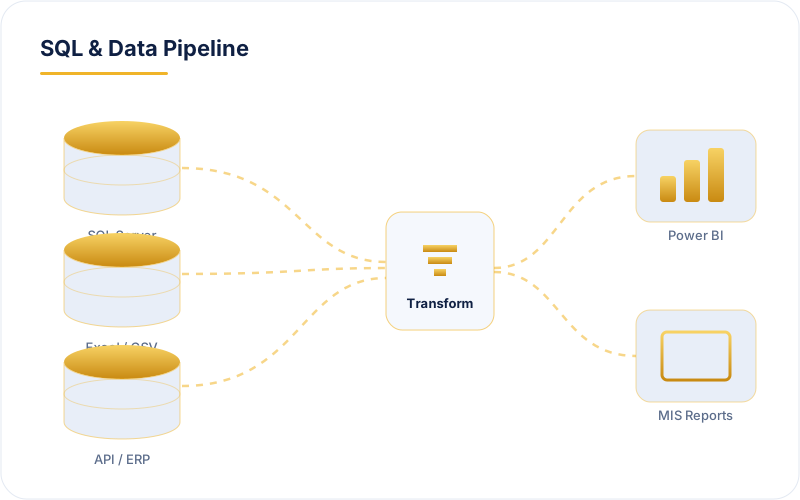
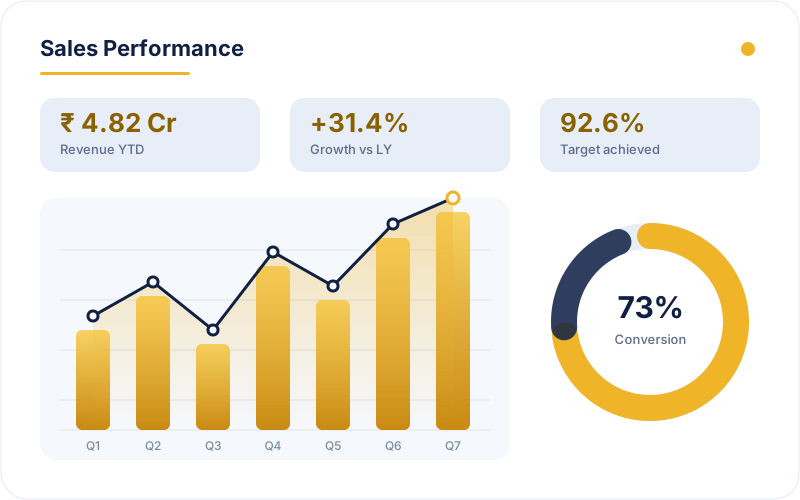
    • Connect SQL Server, Excel/CSV and API sources
    • Clean and model with Power Query and SQL
    • Publish to Power BI or an automated MIS pack
    • Schedule the refresh so it runs without you
    Plan My Track โ†’
    SQL Server, Excel and API sources feeding a transform layer into Power BI and MIS reports

    Not sure which course to choose?

    Tell us your current role and career goal. We will suggest a practical learning path.

    Talk to a Mentor โ†’
